

Shipping with this method takes 3-5 days
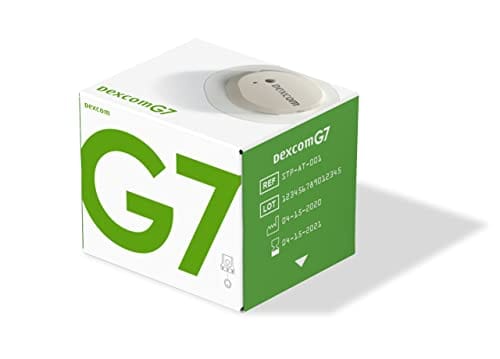
Dexcom G7 sensor (10 days)
Dexcom G7 Sensor Uses and Safety Overview
Price:
$119.99
Secure Encrypted Payments
The Dexcom G7 sensor is a wearable continuous glucose monitoring device used to track glucose trends throughout the day and night. This page explains how the Dexcom G7 sensor (10 days) works, what to expect during wear, and key safety and handling basics. It is written for patients and caregivers who want clear, practical information to discuss with their care team.
What Dexcom G7 sensor Is and How It Works
Continuous glucose monitoring, or CGM, measures glucose in interstitial fluid (the fluid just under the skin) and estimates what your blood glucose is doing over time. BorderFreeHealth works with licensed Canadian partner pharmacies for dispensing. Some patients explore Ships from Canada to US when they need continuity of CGM supplies, but day-to-day use stays the same wherever it’s obtained.
The Dexcom G7 system uses a small, single-use sensor worn on the body. It sends glucose values to a compatible display device, such as a dedicated receiver or a smartphone app, so you can see current values, trend arrows, and patterns. This can support diabetes self-management discussions by showing what happens between fingerstick checks, including overnight and after meals, activity, or stress.
Because CGM measures interstitial glucose, readings can lag behind blood glucose during rapid changes (for example, after treating a low or during intense exercise). Many users also set optional alerts for high or low values to help them notice changes sooner. Dexcom G7 sensor (10 days) is designed for routine replacement at the end of its wear period, so planning ahead for sensor changes is part of using CGM consistently.
Who It’s For
CGM is commonly used by people living with diabetes who benefit from frequent glucose trend information, including those using insulin and many people using non-insulin therapies. It may also be used in some clinical settings for closer monitoring or for people who have difficulty recognizing hypoglycemia (low blood sugar). If you are exploring CGM as part of type 2 diabetes care, browsing the Type 2 Diabetes hub can help you understand how monitoring fits into overall treatment planning.
Not everyone is a good candidate for a wearable sensor. People with significant skin sensitivity to adhesives, frequent rashes, or a history of severe contact dermatitis (skin allergy) may need extra planning with a clinician. CGM should also be used with caution if you cannot respond safely to alarms, or if you are unable to follow device instructions. For broader context on diabetes-related risks that monitoring may help you discuss with your care team, see Diabetes And Heart Attacks and the Type 2 Diabetes Category for additional reading.
Dosage and Usage
CGM sensors are not dosed like medicines, but they do have a labeled wear schedule and setup steps. Dexcom G7 sensor (10 days) is intended for up to 10 days of wear, after which the sensor is removed and replaced with a new one. Always follow the current user guide for your exact setup, pairing, and alert preferences, since device instructions can change over time.
In general, using a CGM sensor involves cleaning and drying the skin, placing the sensor on an approved site, and pairing it with the receiver or app. During wear, you will see glucose values update throughout the day. If the device provides alerts, you can review and adjust those settings with your clinician so they match your daily routines and safety needs.
Making sense of CGM numbers
A CGM display is most useful when you look at trends, not just a single number. Trend arrows can suggest whether glucose is stable, rising, or falling, which may help you decide when to recheck or confirm a value. It is also normal for CGM values to differ from fingerstick results because the measurement site is different. If you feel symptoms that do not match what the sensor shows, confirm with a blood glucose meter and follow your clinician’s guidance for treating highs or lows. Keeping notes about meals, activity, illness, or medication timing can make your CGM reports more meaningful at follow-up visits.
Quick tip: Keep any pairing information and app credentials handy before a sensor change.
Strengths and Forms
The G7 is a wearable sensor used for continuous glucose monitoring. In this system, the transmitter function is integrated into each sensor, so the sensor is replaced as a unit rather than reusing a separate transmitter. Dexcom G7 sensor (10 days) is typically supplied as a single-use wearable component intended for a defined wear period, and it may be packaged with accessory items such as an overpatch depending on the presentation.
Features and compatibility can depend on which display option you use. Some people prefer a receiver for a dedicated screen, while others use a smartphone app for convenience and sharing options. Availability of specific components can vary by jurisdiction and by what a prescriber writes. If you are comparing how different diabetes treatments and monitoring approaches are discussed across the site, resources like Jardiance Vs Farxiga can provide additional context about therapy choices that may influence monitoring needs.
| Item | What to know |
|---|---|
| Device type | Wearable CGM sensor for interstitial glucose trends |
| Wear duration | Designed for a limited wear period; replace per labeling |
| Display | Works with a compatible receiver or smartphone app |
| Data | Shows trends and patterns to review with clinicians |
Storage and Travel Basics
Store sensors according to the package instructions, and check the labeled expiration date before use. As a practical rule, keep sensors in their original packaging until you are ready to apply one, and avoid exposing them to extreme heat, freezing temperatures, or direct sunlight in a car. If a sensor has been stored outside the recommended range, its performance may be less reliable.
For travel, pack enough supplies for the full trip plus extras for unexpected early replacements. Keep sensors in your carry-on rather than checked luggage to reduce temperature swings and the risk of lost bags. You may also want to plan for security screening procedures; manufacturer guidance may recommend alternatives to certain scanners. If you expect medical imaging, ask the imaging center in advance whether the sensor should be removed for MRI, CT, or diathermy (heat therapy), since many wearable devices need to be taken off for safety.
Why it matters: Good storage habits reduce avoidable sensor failures and interrupted monitoring.
Side Effects and Safety
Most side effects with CGM sensors relate to the wear site. Common issues can include skin redness, itching, irritation from adhesives, mild pain, bruising, or minor bleeding where the sensor is inserted. If you have sensitive skin, rotating sites and using skin-prep products recommended by a clinician can sometimes help, but you should avoid using anything that interferes with adhesion or device instructions.
More serious concerns are less common but important to recognize. These can include signs of infection at the site (increasing warmth, swelling, pus, or fever), a severe allergic reaction (widespread rash, hives, facial swelling), or readings that are unexpectedly inaccurate. If symptoms do not match what Dexcom G7 sensor (10 days) displays, confirm with a fingerstick meter and follow your clinician’s plan for safety. Seek urgent care for severe reactions, trouble breathing, or rapidly worsening skin findings.
Also consider safety in daily routines. Keep the sensor away from pressure and friction when possible, and watch for detachment after sweating, bathing, or contact sports. If a sensor loosens, follow the manufacturer’s steps for reinforcement or replacement rather than improvising with materials that may irritate skin.
Drug Interactions and Cautions
CGM readings can be affected by more than food and insulin. Some medicines and medical conditions can interfere with sensor accuracy, and certain drugs may cause falsely high or low readings. For example, the G7 labeling includes warnings about specific medication interferences (such as hydroxyurea in some CGM systems). Always review the current device guidance and tell your clinician about all prescription drugs, over-the-counter medicines, and supplements you use.
Situational factors can matter too. Compression lows (false low readings) can occur when pressure is placed on the sensor site, such as sleeping on it. Dehydration, poor circulation, or rapid glucose shifts may also increase differences between CGM and fingerstick values. If you have kidney disease or other complex conditions, monitoring plans often need extra nuance; see Diabetic Kidney Disease for background you can bring to a clinical conversation.
Compare With Alternatives
CGM is one way to monitor glucose, but it is not the only option. Traditional self-monitoring of blood glucose (SMBG) uses fingerstick checks at specific times, such as before meals or when symptoms occur. SMBG can be a good fit for people who do not want a wearable device, who have adhesive sensitivity, or who mainly need occasional confirmation readings. Laboratory measures like A1C provide an average over time, but they do not show daily swings or alert you to lows.
Other CGM systems exist as well, and they can differ in wear time, alert options, calibration requirements, and compatibility with phones or insulin devices. The best choice depends on clinical goals, daily routines, and how much real-time feedback is useful for you. For related diabetes-care context that can influence monitoring needs, see Metformin And Heart Failure and Exploring Dapagliflozin Uses, which discuss treatment considerations that may prompt closer tracking.
Pricing and Access
Access to CGM supplies can depend on where you live, what documentation is required, and whether a prescription is needed. Many patients receive CGM through a prescriber, and coverage policies vary widely across insurers and plans. For people without insurance, out-of-pocket costs can differ based on the supply chain, the number of sensors needed per month, and whether a receiver is also required.
BorderFreeHealth supports cross-border prescription options on a cash-pay basis, subject to eligibility and jurisdiction. When required, prescription details are confirmed with your prescriber before dispensing. In practical terms, that means you may be asked for a valid prescription, clinician contact information, and basic patient details so the partner pharmacy can dispense appropriately.
Dexcom G7 sensor (10 days) is a recurring supply item, so it helps to think in terms of continuity: how you will manage replacements, what to do if a sensor fails early, and how you will confirm unexpected values. If you are trying to understand how medication selection and monitoring can interact in diabetes care, educational resources like Dapagliflozin Comprehensive Overview, Forxiga Side Effects, and Affordable Options For Dapagliflozin can help you prepare more informed questions for your next visit.
Authoritative Sources
For device-specific instructions, rely on the most current manufacturer materials and regulator-listed information. These sources can help you confirm approved wear sites, setup steps, imaging precautions, and known interferences. If anything you read conflicts with your device’s user guide or your clinician’s advice, the labeled instructions should guide safe use.
Here are several reputable references to consult:
- For the official Dexcom G7 documentation, see Dexcom G7 product and support resources.
- For regulated device details, review FDA device clearance database listings.
- For clinical context on CGM use, consult American Diabetes Association Standards of Care.
After pharmacy processing and any required verification, prompt, express shipping may be available depending on destination and local rules. Keep a backup meter available in case you need confirmatory checks.
This content is for informational purposes only and is not a substitute for professional medical advice.
Express Shipping - from $25.00
Prices:
- Dry-Packed Products $25.00
- Cold-Packed Products $35.00
Shipping Countries:
- United States (all contiguous states**)
- Worldwide (excludes some countries***)
Standard Shipping - $15.00
Shipping with this method takes 5-10 days
Prices:
- Dry-Packed Products $15.00
- Not available for Cold-Packed products
Shipping Countries:
- United States (all contiguous states**)
- Worldwide (excludes some countries***)
How does a Dexcom G7 sensor measure glucose?
The sensor measures glucose in interstitial fluid (the fluid just under the skin) using a tiny filament. The system then estimates glucose values and displays trends on a compatible receiver or smartphone app. Because interstitial glucose can lag behind blood glucose during rapid changes, the number you see may differ from a fingerstick at certain times, such as after eating, exercising, or treating a low. Trend information and alerts can be useful for recognizing patterns to review with your clinician.
How often do I replace the Dexcom G7 sensor?
Replacement timing is based on the labeled wear period for the sensor you are using. Many users plan sensor changes around routines (for example, morning or evening) to make transitions smoother and reduce gaps in data. If a sensor stops early, follow the manufacturer’s troubleshooting steps and your clinician’s guidance for safe monitoring until it is replaced. It can also help to keep a backup blood glucose meter available for confirmatory checks when needed.
Do I still need fingerstick checks with a CGM?
Some people still use fingerstick checks at times, even with CGM. A meter is often recommended when symptoms do not match the CGM display, when the sensor is warming up or giving signal errors, or when you suspect a false low (such as after sleeping on the sensor). Your clinician can clarify when confirmatory checks are most important for your situation. Do not change diabetes medications or insulin doses based solely on general guidance; follow your care plan.
What should I do if the CGM reading doesn’t match how I feel?
Treat symptoms seriously. If you feel signs of hypoglycemia or hyperglycemia but the CGM value seems inconsistent, confirm with a fingerstick blood glucose reading and follow the safety steps your clinician has provided. CGM values can be less accurate during rapid glucose changes, dehydration, or when pressure is applied to the sensor site. If you have repeated mismatches, frequent alarms, or unexplained extremes, contact your clinician and review sensor placement, wear-site condition, and any potential medication interferences.
Can I shower, exercise, or swim while wearing a Dexcom G7 sensor?
Many daily activities are possible while wearing a CGM sensor, but you should follow the device’s water exposure and adhesion guidance. Water, sweat, friction from clothing, and contact sports can loosen adhesives or irritate skin. After bathing or exercise, gently pat the area dry and check that the sensor remains secure. If you use an overpatch or skin-prep product, choose options consistent with the manufacturer’s instructions and discuss skin reactions with a clinician.
What should I ask my clinician before starting CGM?
Useful questions include: what glucose targets and alert thresholds are appropriate for you, when to confirm with a fingerstick meter, and how to respond safely to low or high alerts. You can also ask about wear-site selection, skin care for adhesive sensitivity, and how CGM reports will be used at follow-up visits. If you take medicines that may affect readings or have conditions such as kidney disease, ask whether any extra precautions apply. Bringing a list of medications and supplements helps.
Can medications or supplements interfere with CGM readings?
Yes, certain medications can interfere with some CGM systems and may cause readings to appear higher or lower than they truly are. Device labeling may name specific drugs known to interfere, and these details can change as guidance updates. Tell your clinician about all prescription medicines, over-the-counter products, and supplements you take, including intermittent use. If you start a new medication and notice unexpected CGM patterns, confirm with a fingerstick meter and review the issue with your care team.
Rewards Program
Earn points on birthdays, product orders, reviews, friend referrals, and more! Enjoy your medication at unparalleled discounts while reaping rewards for every step you take with us.
You can read more about rewards here.
POINT VALUE
How to earn points
- 1Create an account and start earning.
- 2Earn points every time you shop or perform certain actions.
- 3Redeem points for exclusive discounts.
How to book an appointment
- 1Create Begin by completing a profile or log into your existing account. This step ensures we have the necessary information to provide you with a service that's tailored to your needs. account and start earning.
- 2Scheduling an appointment with our online booking system is easy. Pick a day and time that suits you. You’ll receive an immediate confirmation, without the wait.
- 3Discuss your concerns and symptoms and receive a thorough diagnosis from one of our licensed doctors during a confidential video appointment.
- 4If you've been prescribed medication, your Rx is sent directly to one of our licensed pharmacies and delivered right to your door.
Get Started
To book an online doctor appointment, register for an account or login. After doing so, you can book your visit on this page.
You Might Also Like
Select options
This product has multiple variants. The options may be chosen on the product page
Select options
This product has multiple variants. The options may be chosen on the product page
Select options
This product has multiple variants. The options may be chosen on the product page
Select options
This product has multiple variants. The options may be chosen on the product page