

Shipping with this method takes 3-5 days
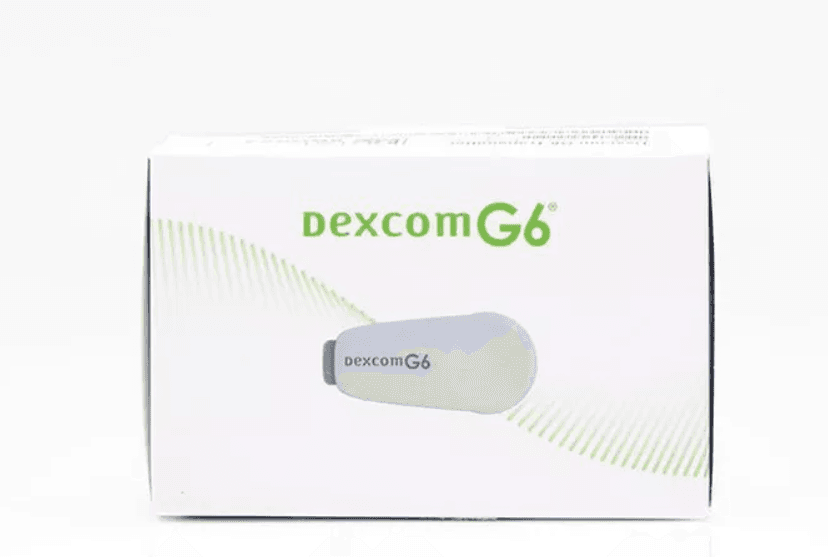
Dexcom G6 Transmitter
Dexcom G6 Transmitter: Uses, Pairing, and Safety Overview
Price:
$49.99
Secure Encrypted Payments
The Dexcom G6 Transmitter is a reusable component of the Dexcom G6 continuous glucose monitoring system. It sends glucose data from the sensor to a compatible display device. This page explains how it fits into daily diabetes care, plus practical handling and safety basics.
Some patients explore Ships from Canada to US for continuity when local inventory varies. If you are new to CGM, it can also help to understand what the transmitter does versus the sensor and receiver, and which steps matter most for reliable readings over time.
What Dexcom G6 Transmitter Is and How It Works
In the Dexcom G6 system, the sensor measures glucose in interstitial fluid (the fluid between cells). The transmitter is the reusable “bridge” that snaps into the sensor housing and sends readings to a phone app or a dedicated receiver using Bluetooth. The display device then turns those readings into trend arrows, graphs, and alerts that can support day-to-day awareness.
For eligible U.S. orders, BorderFreeHealth coordinates with licensed Canadian partner pharmacies. From a practical standpoint, most day-to-day issues people notice involve pairing, connectivity range, and keeping the sensor site secure so the transmitter stays seated correctly. If readings do not match symptoms, the label typically advises confirming with a fingerstick glucose meter and following your clinician’s plan for treating highs or lows.
- Sensor measures glucose: collects data under the skin
- Transmitter sends data: communicates to a display
- Receiver or phone shows trends: provides alerts and history
Why this matters is simple: CGM is about patterns, not just single numbers. A stable signal and correct setup can make trend information more useful for discussions with your diabetes care team.
Who It’s For
This device component is for people using the Dexcom G6 CGM system as part of diabetes management. CGM is commonly prescribed for type 1 diabetes and is also used by many people with Type 2 Diabetes when a clinician believes continuous data will help with safety or treatment adjustments. Some pregnant patients or people with medication-related hypoglycemia risk may also be candidates, depending on local indications and prescriber judgment.
CGM may be especially helpful for people who experience low-glucose unawareness, wide daily variability, or frequent therapy changes. It is not a substitute for medical evaluation, and it may not be appropriate for every situation. Device use can be limited by skin sensitivity, challenges with wearing a sensor, or difficulties using a compatible smartphone or receiver.
If you are building a broader care plan, you may also want to browse educational resources in Type 2 Diabetes Posts to understand how monitoring, nutrition, and medications are discussed in everyday language. These topics can shape what you and your clinician decide to focus on during follow-up visits.
Dosage and Usage
Because this is a device, “dosage” refers to labeled wear and replacement schedules rather than milligrams. The transmitter is typically designed for a multi-month wear period, while sensors are intended for shorter wear cycles; follow the manufacturer’s instructions and the prompts in the app/receiver. When it is time to start a new transmitter, pairing (sometimes called “start” or “activate”) is done in the display device settings by entering the transmitter serial number and following on-screen steps.
Many users look for ways to replace a transmitter while keeping the sensor in place. In general, replacing the Dexcom G6 Transmitter without removing the sensor may be possible depending on where you are in the sensor session and the manufacturer’s instructions. Avoid improvised tools or forceful removal, since cracking the sensor housing or loosening the adhesive can lead to early sensor failure and unreliable readings.
Quick tip: Write down the transmitter serial number before insertion.
Practical use also includes confirming that your phone model and operating system are supported. Compatibility can change with software updates, so it helps to check the manufacturer’s current list before relying on a new device for alerts overnight or during driving.
Strengths and Forms
There are no medication strengths for a transmitter, but there are different ways the components are packaged. You may see the transmitter offered alone, as part of a starter kit, or paired with sensors depending on the supplier. Packaging identifiers (for example, 08627001601) may appear on some boxes and can help reduce mix-ups when patients manage multiple diabetes supplies at home.
It also helps to understand how the transmitter relates to other parts of the system, since patients sometimes search for “dexcom receiver and transmitter” as if they were a single unit. They work together, but they are distinct items with different replacement timelines.
| Component | Role | Common replacement trigger |
|---|---|---|
| Sensor | Measures glucose under the skin | End of sensor session |
| Transmitter | Sends readings via Bluetooth | End of transmitter life |
| Receiver or phone | Displays data and alerts | Device upgrade or malfunction |
If you are comparing listings, look for clear labeling that distinguishes a new transmitter from any refurbished option. If anything about labeling is unclear, it is safer to pause and verify before use.
Storage and Travel Basics
Store your spare transmitter according to the manufacturer’s instructions, usually at controlled room temperature and away from excess moisture. Avoid leaving it in a hot car, near heaters, or in direct sun for long periods. Do not freeze the unit, and keep it in its original packaging until you are ready to start it, since packaging can help protect contacts and reduce accidental damage.
For travel, plan for the basics: a backup glucose meter, extra sensors, skin prep supplies you tolerate, and charging access for a phone or receiver. If you carry a spare Dexcom G6 Transmitter, keep it in your carry-on rather than checked baggage so temperature swings are less extreme and you can respond if a sensor fails early.
Why it matters: Extreme temperatures can shorten battery life and disrupt connectivity.
Screening equipment at airports can vary, so follow the current manufacturer guidance for security screening and imaging. If you have frequent imaging studies, discuss CGM wear with your care team so you know when removal is needed and how to restart safely afterward.
Side Effects and Safety
This product is not a drug, so side effects are usually related to wear and skin contact rather than systemic reactions. Common issues include redness, itching, rash, or blistering at the sensor adhesive site. Less commonly, people may develop worsening dermatitis (skin inflammation) or an adhesive allergy that requires a different barrier method or a different CGM system. If you see drainage, warmth, or spreading redness, seek prompt clinical evaluation because infection is possible with any device that sits on the skin.
Safety also includes decision-making. CGM values can lag behind blood glucose during fast changes, and compression (lying on the sensor) may cause temporarily low readings. If symptoms do not match the number, confirm with a fingerstick and follow your clinician’s treatment plan. Pay extra attention during driving, intense exercise, illness, or medication changes.
When replacing or troubleshooting the Dexcom G6 Transmitter, be cautious about online “reset” methods. The manufacturer’s instructions generally do not support extending use beyond labeled life, and improvised resets can increase the chance of missed alerts or confusing error messages.
Drug Interactions and Cautions
While the transmitter itself does not interact with medications the way a pill would, certain drugs and clinical situations can affect CGM accuracy. The device labeling includes warnings about substances that may cause false readings in some CGM systems (for example, certain chemotherapy agents such as hydroxyurea). If you take medications known to interfere, ask your clinician whether confirmatory fingersticks should be used more often during that time.
Procedural cautions matter, too. Many CGM components should be removed before MRI, CT, diathermy, or some types of X-ray exposure because the equipment can damage the device or cause unsafe heating. Also consider everyday environmental issues: strong electromagnetic sources, worn-out phone batteries, and Bluetooth conflicts can all contribute to signal loss.
- Imaging procedures: follow removal guidance
- Interfering medicines: confirm label warnings
- Signal reliability: keep devices updated
If you live alone or have severe hypoglycemia history, discuss alert settings and data-sharing options with your care team or caregiver. Those steps can improve safety without changing any medication.
Compare With Alternatives
Patients and clinics often compare CGM systems based on wear time, sensor size, alert features, and phone compatibility. One alternative is the Dexcom G7, which integrates the sensor and transmitter into a single wearable and uses a different replacement cycle. Another common comparison is Abbott FreeStyle Libre systems, which may differ in alarm behavior, scanning requirements (depending on model), and app experience. Medtronic Guardian systems are also used in some settings, especially with certain insulin pump integrations.
The right choice depends on your treatment goals, comfort with alarms, and which devices you can reliably use every day. If you are managing type 2 diabetes alongside cardiovascular or kidney concerns, your clinician may emphasize monitoring patterns alongside medication choices; background reading like Connection Between Diabetes And Heart Attacks can help frame that discussion without implying any one tool is best for everyone.
Some people also compare how CGM data supports medication decisions. If you are learning about diabetes therapies, resources such as Jardiance Vs Farxiga and Exploring Dapagliflozin Uses can provide context for conversations with a prescriber while you keep monitoring consistent.
Pricing and Access
Access to CGM supplies can vary based on prescription requirements, plan rules, and documentation needed to show medical necessity. Some patients focus on g6 transmitter cost because the transmitter is replaced less often than sensors, but it can still be a meaningful ongoing expense. Coverage differs by insurer, and rules may change when your therapy changes (for example, starting insulin or adjusting risk factors).
When required, the pharmacy confirms prescription details with the prescriber before dispensing. In cash-pay situations, including for people without insurance, out-of-pocket amounts can be influenced by whether the item is new or refurbished, what warranty applies, and whether you are receiving the transmitter alone or as part of a kit. It is also reasonable to ask how authenticity is verified, since reliable alerts depend on correct hardware.
Practical access also includes the paperwork side: keeping your prescription current, tracking when a transmitter is due to expire, and saving device serial numbers for support calls. If you are looking for general program updates, the Promotions Page may list site-wide information that applies to eligible orders, but availability and requirements can vary by jurisdiction.
Many people use CGM alongside medication changes, nutrition shifts, or new exercise routines. If you are balancing diabetes with other risks, educational reading like Diabetic Kidney Disease Treatment, Metformin And Heart Failure, and Forxiga Side Effects And Warnings can help you prepare questions for your next visit while keeping device use stable.
Authoritative Sources
For the most accurate setup steps and safety warnings, rely on the current manufacturer documentation for your specific display device and app version. Clinical organizations also publish general guidance on how CGM fits into diabetes management, including when confirmatory fingersticks are recommended and how to interpret trends.
For official device instructions, review: Dexcom guides and user manuals.
For diabetes technology context, see: American Diabetes Association CGM overview.
For eligible orders that are processed through partner pharmacies, delivery may use prompt, express shipping when available.
This content is for informational purposes only and is not a substitute for professional medical advice.
Express Shipping - from $25.00
Prices:
- Dry-Packed Products $25.00
- Cold-Packed Products $35.00
Shipping Countries:
- United States (all contiguous states**)
- Worldwide (excludes some countries***)
Standard Shipping - $15.00
Shipping with this method takes 5-10 days
Prices:
- Dry-Packed Products $15.00
- Not available for Cold-Packed products
Shipping Countries:
- United States (all contiguous states**)
- Worldwide (excludes some countries***)
What does the transmitter do in the Dexcom G6 system?
The transmitter is the reusable part that sends glucose readings from the sensor to a display device (a compatible phone app or a dedicated receiver). The sensor measures glucose under the skin, and the transmitter communicates that data over Bluetooth so you can see current values, trend arrows, and alerts. If signal drops occur, the issue is often related to distance, Bluetooth settings, or the transmitter not being fully seated in the sensor housing. Always follow the manufacturer’s instructions for setup and troubleshooting.
How long does a Dexcom G6 transmitter last?
The Dexcom G6 transmitter is designed for a multi-month wear period, and it will indicate when it is nearing the end of its labeled life. Exact duration can vary based on how it is started and the system’s built-in shutoff timing. Because the battery is sealed, it is not meant to be recharged or replaced. If you depend on alerts for safety, it helps to plan ahead when the system shows end-of-life notifications so you are not forced to improvise at the last minute.
Can I replace the transmitter without removing the sensor?
In some situations, people can swap transmitters while leaving the sensor in place, but the safe approach is to follow the manufacturer’s instructions for your specific setup. Trying to pry the transmitter out with makeshift tools can crack the plastic housing, loosen adhesive, or cause the sensor to fail early. If you are unsure whether your sensor session can continue after a transmitter change, consider contacting the manufacturer’s technical support or asking your diabetes clinic what they recommend for your circumstance.
How do I pair a new transmitter with my receiver or phone?
Pairing usually involves entering the transmitter serial number into the app or receiver and then following on-screen prompts. Steps can differ slightly between phones and the dedicated receiver, and operating system updates can affect Bluetooth behavior. Before starting, confirm your device is compatible and Bluetooth is enabled. If pairing fails, common checks include restarting Bluetooth, moving other Bluetooth accessories away, and confirming the serial number was entered correctly. Use the official user guide for step-by-step instructions.
What should I do if my CGM shows signal loss or inconsistent readings?
Start with practical checks: keep the display device within range, ensure Bluetooth is on, and confirm the transmitter is fully seated. If readings seem inconsistent with how you feel, confirm with a fingerstick glucose meter and follow your clinician’s safety plan for highs or lows. Compression (lying on the sensor) and rapid glucose changes can also affect readings. Persistent errors, repeated “signal loss,” or frequent dropouts may require troubleshooting with the manufacturer or replacing a component.
What safety issues should I watch for at the sensor site?
Watch for skin irritation that worsens over time, blistering, or a rash that spreads beyond the adhesive area. Also look for signs of infection such as increasing warmth, swelling, pain, pus, or fever. People with sensitive skin sometimes need barrier products or different site rotation practices, but those choices are best discussed with a clinician. If you have severe hypoglycemia risk, confirm how to respond to alerts and when to verify results with a fingerstick, especially during driving or exercise.
What should I ask my clinician before starting or changing CGM use?
Useful questions include: how CGM data should guide your day-to-day decisions, when to confirm with a fingerstick, and which alert thresholds make sense for your risk profile. You can also ask about site rotation, managing adhesive reactions, and how CGM fits with your current medications. If you take drugs that may interfere with CGM readings, ask whether you should do extra confirmatory checks during those periods. Finally, ask how often your clinician wants to review CGM reports and what patterns matter most.
Rewards Program
Earn points on birthdays, product orders, reviews, friend referrals, and more! Enjoy your medication at unparalleled discounts while reaping rewards for every step you take with us.
You can read more about rewards here.
POINT VALUE
How to earn points
- 1Create an account and start earning.
- 2Earn points every time you shop or perform certain actions.
- 3Redeem points for exclusive discounts.
How to book an appointment
- 1Create Begin by completing a profile or log into your existing account. This step ensures we have the necessary information to provide you with a service that's tailored to your needs. account and start earning.
- 2Scheduling an appointment with our online booking system is easy. Pick a day and time that suits you. You’ll receive an immediate confirmation, without the wait.
- 3Discuss your concerns and symptoms and receive a thorough diagnosis from one of our licensed doctors during a confidential video appointment.
- 4If you've been prescribed medication, your Rx is sent directly to one of our licensed pharmacies and delivered right to your door.
Get Started
To book an online doctor appointment, register for an account or login. After doing so, you can book your visit on this page.
You Might Also Like
Select options
This product has multiple variants. The options may be chosen on the product page
Select options
This product has multiple variants. The options may be chosen on the product page
Select options
This product has multiple variants. The options may be chosen on the product page
Select options
This product has multiple variants. The options may be chosen on the product page