
Shipping with this method takes 3-5 days
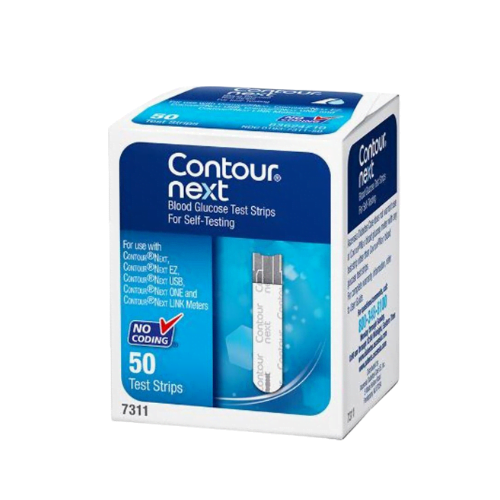
Contour Next Test Strips
Buy Contour Next Test Strips Online
Secure Encrypted Payments
Contour Next Test Strips are single-use blood glucose testing strips for compatible Contour Next meters. You can buy Contour Next Test Strips online, view the current price shown during ordering, and choose the quantity that fits your testing routine. Match the strip family to your meter model and follow your clinician’s testing schedule for routine diabetes monitoring.
These strips are used with a small fingertip blood sample to help measure blood sugar at home, work, school, or while traveling. The most important ordering step is compatibility: the meter, strip chemistry, and software must be designed to work together. Keep enough supplies on hand so routine monitoring is not interrupted by reorder timing or travel plans.
Contour Next Test Strips Price and Quantity Choices
The Contour Next Test Strips price depends on the quantity and pack presentation shown during ordering. Smaller packs may suit occasional testing, while larger supplies may be more practical for people who test several times daily. Use the total strip count, not only the box count, when estimating how long a supply may last.
Common shopper comparisons include contour strips 50, contour strips 100, and larger count searches. Those terms describe quantity intent, but the right choice still depends on the count available at checkout, the expiration date, and how often your care plan requires testing. A person checking fasting glucose only may use strips differently than someone checking before meals, after meals, and when symptoms feel unusual.
Price comparisons work best when the product family is the same. Contour blood glucose strips, contour blood sugar test strips, contour glucometer strips, and next test strips may appear in search results, but similar wording does not guarantee meter compatibility. Choose strips labeled for the Contour Next family and avoid substituting strips made for unrelated meter systems.
Quick tip: Keep your meter beside you while ordering so the model name can be matched to the strip package.
How to Order and Match the Right Strips
Start with the exact meter name printed on the device or inside the meter settings. Then choose the Contour Next strip quantity that matches your testing frequency and expected use before expiration. If you use a Contour Next EZ meter, look for strips for Contour Next EZ or contour next ez strips that are clearly described for the Contour Next family.
BorderFreeHealth offers cash-pay ordering with US delivery from Canada when appropriate for the product and order. We may review order details when needed, and prompt, express shipping may be available. Delivery timing should not be treated as a substitute for keeping a backup supply of strips, lancets, and meter batteries.
If you are paying without insurance, estimate your monthly strip use before selecting a quantity. Include related items such as lancets, control solution, alcohol swabs if you use them, and replacement batteries. You can also browse the Diabetes Supplies category when planning testing supplies together.
Compatible Meters and Product Matching
Contour Next Test Strips are intended for the Contour Next family of blood glucose meters. Many people ask what test strips will work with Contour Next. The direct answer is: use the strip type specified for your exact Contour Next meter in the meter manual and on the strip packaging.
Do not interchange strips across unrelated meter brands or older systems unless the manufacturer’s instructions specifically allow it. A strip contour test relies on a matched meter, enzyme chemistry, and reading algorithm. Using the wrong strip can produce error messages, failed tests, or misleading readings that may affect treatment decisions.
| What to Check | Why It Matters |
|---|---|
| Meter model name | Confirms the correct strip family before ordering. |
| Strip package name | Helps avoid confusing similar Contour or Bayer product names. |
| Total strip count | Supports monthly supply planning based on testing frequency. |
| Expiration date | Expired strips may give unreliable or failed readings. |
| Storage instructions | Heat and moisture can damage strip chemistry. |
Names such as bayer contour strips, contour ez strips, bayer glucose strips, and contour meter strips can refer to different products depending on context. Rely on the meter manual and the package description rather than color, shape, or a partial name. If a reading seems inconsistent with symptoms, repeat the test with a new strip after washing and drying your hands.
What Blood Glucose Test Strips Are Used For
Contour blood test strips are used for in vitro blood glucose testing, meaning the test is performed outside the body on a blood sample. The strip receives a small drop of blood, the meter measures the reaction on the strip, and the result appears within seconds. This information can help track patterns and guide decisions already discussed with a healthcare professional.
People living with Type 2 Diabetes, Type 1 Diabetes, or gestational diabetes may be asked to test at specific times. Common testing times include fasting, before meals, after meals, before driving, before exercise, during illness, or when symptoms suggest high or low blood sugar.
Blood sugar test strips do not treat diabetes and do not replace a care plan. They provide information. Your clinician determines when results should lead to food, activity, medication, or urgent-care steps. If a reading is very high or very low, or if symptoms feel severe, follow the action plan given by your healthcare professional.
How to Use Contour Blood Sugar Test Strips
Wash and dry your hands before testing. Insert one strip into the compatible meter, wait for the ready signal, and use a sterile lancet to obtain a small fingertip blood drop. Touch the blood to the sampling end of the strip until the meter confirms that enough blood has been applied.
Many Contour Next meters are known for second-chance sampling, which may allow more blood to be added within a short time if the first sample is too small. Follow the instructions for your meter because timing and error messages can vary. A used strip should never be saved for later, even if the meter did not produce a result.
- Clean hands: Food residue can affect the glucose reading.
- Dry skin: Water may dilute the blood sample.
- Fresh lancet: A new lancet may reduce discomfort.
- New strip: Each contour blood sugar strip is for one test only.
- Steady sampling: Let the strip draw blood as directed by the meter.
Finger choice depends on comfort, circulation, and the technique taught by your clinician. Many people use the side of a fingertip rather than the center pad because it may be less tender. Rotate fingers to reduce soreness, and do not lance skin that is bruised, infected, swollen, or difficult to clean.
Timing, First Drop Questions, and Result Checks
The best time to test depends on your diabetes type, treatment plan, meals, activity, pregnancy status, and risk of hypoglycemia. Some people test once daily or only at selected times. Others, especially insulin users or people adjusting therapy, may need more structured monitoring.
If you miss a planned test, follow your clinician’s instructions instead of taking several back-to-back readings without a reason. Repeated fingersticks can make fingertips sore and may not add useful information unless you are confirming an unexpected result. Your glucose log or meter app is often most helpful when it shows patterns over time.
Some clinicians teach patients to wipe away the first drop of blood, especially when contamination from food, lotion, or handling is possible. The reason is practical: residue on the skin can mix with the sample and distort the number. If hands are washed and dried well, your clinician or meter instructions may give a specific method to follow.
Why it matters: Clean sampling technique protects the value of every strip and helps reduce avoidable retesting.
Storage, Handling, and Travel
Keep contour glucose strips in their original vial or package until use. Close the cap immediately after removing a strip. Moisture, heat, and direct sunlight can damage the strip chemistry even when the strip looks normal.
Avoid storing strips in bathrooms, cars, windowsills, or bags exposed to temperature swings. Do not use strips that are wet, bent, torn, discolored, or past the expiration date. If your meter displays repeated errors, try a new strip and consider a control-solution check if your meter instructions recommend it.
For travel, pack your meter, strips, lancets, batteries, and quick glucose treatment supplies in hand luggage. Keep supplies in a protective case to prevent crushing or accidental opening. If travel crosses time zones, ask your clinician how to align testing with meals, insulin, or other diabetes medicines.
Keep the vial label and meter instructions available when traveling. Security staff may ask what the supplies are, and clear packaging can make the process easier. Bring more strips than your usual daily count because illness, delays, schedule changes, or unexpected readings may increase testing needs.
Safety Basics for Fingerstick Testing
Test strips do not cause systemic side effects because they are not taken into the body. The main discomfort comes from lancing the skin. You may notice brief pain, a small drop of bleeding, fingertip soreness, minor bruising, or irritation from frequent testing.
Use a clean lancing device and a fresh lancet as directed. Do not share lancets or lancing devices because sharing blood-contact items can spread infections. Dispose of used lancets in an appropriate sharps container or according to local instructions.
Unexpected readings deserve careful handling. If the number does not match how you feel, wash and dry your hands, repeat the test with a new strip, and follow your care plan. Seek urgent medical help for severe symptoms such as confusion, fainting, chest pain, trouble breathing, persistent vomiting, or signs of diabetic ketoacidosis.
Certain conditions and substances may affect meter accuracy. Severe dehydration, unusual hematocrit values, altitude, temperature extremes, and some interfering substances can influence results depending on the meter system. Follow the labeling for your exact Contour Next meter and ask your clinician how to handle readings that conflict with symptoms.
Control Solution and Quality Checks
Control solution checks whether the meter and strips are working together within the expected range. It does not test your body’s glucose level and does not calibrate your diabetes treatment. Use it when the meter instructions recommend a quality check, such as after opening a new vial, dropping the meter, or seeing unexpected results.
The control range is usually printed on the strip vial or package. If the control result falls outside that range, do not use the strips for treatment decisions until the cause is found. Possible causes include expired strips, damaged strips, contaminated control solution, a testing technique issue, or a meter problem.
Keep control solution capped and note any discard date after opening if the bottle instructions require it. Record repeated errors, failed tests, or unusual patterns so they can be reviewed alongside your glucose log. Practical quality checks can prevent avoidable waste and help maintain confidence in routine testing.
Comparing Related Diabetes Supplies
If your current meter is not part of the Contour Next family, choose the strip line made for that device. Blood sugar test strips contour searches can surface many similar products, so compatibility should come before price or quantity. A strip made for one system should not be assumed to work in another system.
People building a testing kit may need a meter, strips, lancets, control solution, a lancing device, batteries, and a carrying case. Category browsing can help group supply decisions, while your clinician can clarify how often testing should occur. For condition-specific education, browse the Type 2 Diabetes and Type 1 Diabetes article categories.
Be cautious with offers for free Contour Next test strips. Some programs may have specific enrollment rules, insurance requirements, or promotional limits that vary by seller or manufacturer. When ordering for routine use, rely on the current product quantity, meter compatibility, expiration date, and total cost shown during checkout.
What to Ask Your Clinician
Your healthcare professional can tell you how often to test and which glucose ranges apply to your care plan. The answer may depend on diabetes type, medicines, pregnancy, recent illness, diet changes, exercise patterns, and risk of low blood sugar. Bring your meter or app log to appointments because trends usually matter more than a single isolated reading.
- Testing schedule: Ask which times of day are most useful.
- Target ranges: Confirm fasting, pre-meal, and post-meal goals.
- Low readings: Review when and how to treat hypoglycemia.
- High readings: Know when to recheck and when to seek help.
- Technique: Ask whether to wipe away the first drop.
- Quality checks: Confirm when to use control solution.
- Supply planning: Estimate how many strips you need each month.
If fingertip testing is painful, ask about lancing depth, alternate finger rotation, lancet size, and whether your meter instructions allow alternate-site testing. Do not change testing frequency or treatment decisions based only on supply concerns. Your clinician can help balance safety, monitoring needs, and practical supply planning.
Authoritative Sources
| Resource | Link |
|---|---|
| FDA information on blood glucose monitoring devices | FDA Blood Glucose Monitoring Devices |
This content is for informational purposes only and is not a substitute for professional medical advice.
Blood Glucose Unit Converter
Convert glucose readings between mg/dL and mmol/L without changing the clinical value.
mg/dL
-
US reporting unit
mmol/L
-
International reporting unit
These calculations are for education only and do not replace clinical advice, diagnosis, or treatment. Always confirm medical decisions with a qualified healthcare professional.
HbA1c & eAG Calculator
Convert between HbA1c percentage and estimated average glucose using the ADAG relationship.
HbA1c
-
percentage
eAG mg/dL
-
estimated average glucose
eAG mmol/L
-
estimated average glucose
These calculations are for education only and do not replace clinical advice, diagnosis, or treatment. Always confirm medical decisions with a qualified healthcare professional.
CGM Time-in-Range Summary
Summarise CGM percentages across very low, low, in-range, high, and very high glucose bands.
Entered total
-
should equal 100%
Below range
-
very low plus low
Above range
-
high plus very high
Summary
-
common adult CGM targets vary by patient
These calculations are for education only and do not replace clinical advice, diagnosis, or treatment. Always confirm medical decisions with a qualified healthcare professional.
Corrected Sodium Calculator
Estimate sodium corrected for hyperglycemia using common 1.6 and 2.4 correction factors.
Corrected sodium
-
1.6 factor
Corrected sodium
-
2.4 factor
These calculations are for education only and do not replace clinical advice, diagnosis, or treatment. Always confirm medical decisions with a qualified healthcare professional.
Serum Osmolality Calculator
Estimate calculated serum osmolality from sodium, glucose, and BUN or urea.
Calculated osmolality
-
mOsm/kg
These calculations are for education only and do not replace clinical advice, diagnosis, or treatment. Always confirm medical decisions with a qualified healthcare professional.
Express Shipping - from $29.99
Prices:
- Dry-Packed Products $29.99
- Cold-Packed Products $39.99
Shipping Countries:
- United States (all contiguous states**)
- Worldwide (excludes some countries***)
Standard Shipping - $19.99
Shipping with this method takes 5-10 days
Prices:
- Dry-Packed Products $19.99
- Not available for Cold-Packed products
Shipping Countries:
- United States (all contiguous states**)
- Worldwide (excludes some countries***)
What test strips work with Contour Next meters?
Use test strips labeled for the Contour Next family and match them to the exact meter model named in your meter manual. Do not rely on similar product names alone, because strips from unrelated meter systems may not work correctly.
Can Contour Next Test Strips be used more than once?
No. Each strip is for one blood glucose test only. Reusing a strip can cause an error, failed test, or unreliable result, even if the first test did not produce a reading.
Which finger is best for checking blood sugar?
Many people use the side of a fingertip and rotate fingers to reduce soreness. Avoid skin that is bruised, swollen, infected, or hard to clean, and follow the technique recommended by your clinician or meter instructions.
Why do some people wipe away the first drop of blood?
Wiping away the first drop may reduce contamination from food, lotion, or residue on the skin. Your clinician or meter guide can tell you whether that step is recommended for your testing routine.
How should Contour Next Test Strips be stored?
Keep strips in their original container, close the cap promptly, and protect them from heat, moisture, and direct sunlight. Do not use strips that are expired, wet, bent, torn, or stored outside the manufacturer’s instructions.
What should I do if a reading does not match how I feel?
Wash and dry your hands, repeat the test with a new strip, and follow your diabetes care plan. Seek urgent medical help for severe symptoms such as confusion, fainting, trouble breathing, persistent vomiting, or signs of diabetic ketoacidosis.
Rewards Program
Earn points on birthdays, product orders, reviews, friend referrals, and more! Enjoy your medication at unparalleled discounts while reaping rewards for every step you take with us.
You can read more about rewards here.
POINT VALUE
How to earn points
- 1Create an account and start earning.
- 2Earn points every time you shop or perform certain actions.
- 3Redeem points for exclusive discounts.
You Might Also Like
Select options
This product has multiple variants. The options may be chosen on the product page
Select options
This product has multiple variants. The options may be chosen on the product page
Select options
This product has multiple variants. The options may be chosen on the product page
Select options
This product has multiple variants. The options may be chosen on the product page