

Shipping with this method takes 3-5 days
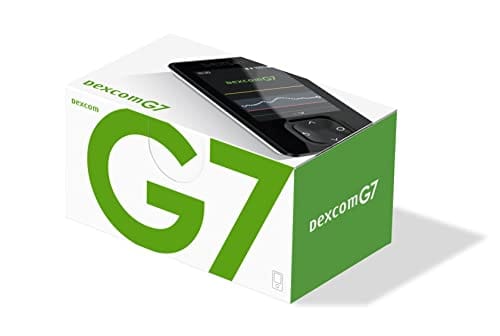
Dexcom G7 Receiver
Dexcom G7 Receiver Uses, Setup, and Safety Overview
Price:
$99.99
Secure Encrypted Payments
Dexcom G7 Receiver is a handheld display device used with the Dexcom G7 continuous glucose monitoring system to show glucose readings, trends, and alerts. Some patients explore Ships from Canada to US options as part of ongoing diabetes care planning. This page explains practical setup, day-to-day use, safety cautions, and handling basics in plain language.
Because CGM data can influence daily decisions, it helps to understand what the receiver does, what it does not do, and when to confirm readings with a blood glucose meter. The information below is general and should be used alongside the official user guide and your clinician’s instructions.
What Dexcom G7 Receiver Is and How It Works
A CGM receiver is a dedicated screen that displays glucose information transmitted from a wearable sensor. For eligible U.S. patients, BorderFreeHealth coordinates with licensed Canadian partner pharmacies for certain prescription items. The receiver can be helpful when a phone is not available, when a separate medical device is preferred, or when a caregiver needs a consistent display in a school or home setting.
In most CGM systems, the sensor measures glucose in interstitial fluid (the fluid between cells) and sends the data wirelessly to a display. The display may show a current value, a directional trend arrow, and a graph of recent readings. That trend context can support safer conversations with a care team about patterns such as morning highs or overnight lows, even when single spot checks look fine.
Dexcom G7 Receiver is designed to be paired to compatible G7 sensors and used as the primary viewing device or as a backup to another display option, depending on the system setup. It does not replace diabetes education, medication counseling, or emergency planning for severe hypoglycemia (low blood sugar). It also cannot measure ketones, and it does not deliver insulin.
It is still important to know how the system behaves when data is missing or delayed. Wireless connection issues, sensor warm-up periods, and “signal loss” messages can happen with any connected device. When a prescription is required, the dispensing pharmacy may verify prescription details with the prescriber before release, which helps reduce avoidable mismatches in records.
Who It’s For
This receiver is intended for people who use the Dexcom G7 CGM system and want a stand-alone display device rather than relying only on a phone. It may be considered for adults or pediatric patients when a clinician recommends CGM, including people managing type 1 diabetes or type 2 diabetes, as discussed in the condition hubs for Type 1 Diabetes and Type 2 Diabetes. A dedicated receiver can also be useful in environments where phone access is restricted or inconsistent.
CGM use is not a fit for everyone. At a high level, it may be inappropriate when a person cannot safely respond to alerts, cannot maintain required device hygiene, or has a known severe allergy to sensor adhesives or components. People with certain medical devices, occupational exposures, or upcoming procedures may need special precautions. If you are browsing other diabetes support tools, the Diabetes Care hub can help you compare categories like meters, strips, and related supplies.
Clinicians may also advise extra care for patients who have frequent severe hypoglycemia, hypoglycemia unawareness, or a history of diabetic ketoacidosis. In those settings, CGM alerts can be valuable, but only when the patient and caregivers have a clear action plan for confirmation testing and treatment steps. Educational resources such as Low Blood Sugar Symptoms and Signs And Symptoms Of Hyperglycemia can support safer recognition of warning signs.
Dosage and Usage
Because this is a medical device, “usage” is about setup, pairing, and day-to-day viewing rather than a medication dose. Dexcom G7 Receiver is typically used continuously throughout the day to display glucose information sent from the sensor. Exact steps vary by the system configuration and the manufacturer’s instructions, so the user guide should be the primary reference for menus, icons, and alerts.
General use basics often include:
- Initial setup: set language, time, and alert preferences.
- Pairing: connect the receiver to a newly started sensor.
- Monitoring: review current value, trend, and history.
- Alerts: respond to low or high glucose alarms.
- Maintenance: charge as directed and keep the screen clean.
Why it matters: Alert settings that fit daily routines can reduce missed lows, especially overnight.
Some people use CGM values for day-to-day decisions, but there are times when confirmation with a fingerstick meter is still recommended. Examples include when symptoms do not match the displayed glucose, when the device indicates a potential error, or when the reading is changing rapidly. A clinician can clarify when confirmatory checks matter most for your treatment plan, especially if insulin or sulfonylureas are used.
Strengths and Forms
This product is a handheld receiver, sometimes described as a CGM display device. Unlike medications, it does not come in milligram strengths. It is also distinct from the wearable sensor and any insertion components used to start a new sensor session.
Dexcom G7 Receiver may be provided as a single receiver unit, and availability can differ by jurisdiction and supply chain. Package contents can also vary, so it is important to review the listing details and any included documentation. If you already use other monitoring tools, a receiver may serve as a dedicated screen while a standard meter remains available for confirmatory checks or for times when CGM data is unavailable.
For many patients, the main “form” decision is whether to view CGM information on a phone, a receiver, or both. A separate receiver can be easier to hand off to a caregiver, store in a diabetes kit, or use during work shifts where personal phone use is limited.
Storage and Travel Basics
Like other electronic medical devices, the receiver should be protected from moisture, extreme temperatures, and physical impacts. Store it in a clean, dry place and avoid leaving it in a hot car, near heaters, or in direct sunlight for long periods. If the screen becomes dirty, follow the manufacturer’s cleaning guidance and avoid harsh chemicals that can damage plastics.
Dexcom G7 Receiver is usually carried with other diabetes essentials, such as a meter, fast-acting carbohydrates, and a back-up charging option. For travel days, plan for longer periods away from outlets and consider how you will keep the device accessible during security screening and transit. If you use a separate meter, review instructions and supplies in advance so you are not relying on a single data source.
Quick tip: Keep a dedicated charging cable in your diabetes travel bag.
When traveling across time zones, check the receiver’s clock settings and alert schedules, since time-based features may behave differently if the device time is incorrect. If you notice unexpected alert timing after travel, consult the user guide for how to confirm the date and time settings.
Side Effects and Safety
The receiver itself does not contact skin for long periods, so it is less likely to cause physical side effects. Most CGM-related adverse effects are associated with the wearable sensor, such as skin irritation, redness, or discomfort at the insertion site. Rarely, users can develop more significant dermatitis (skin inflammation) from adhesives, which may require changing products or using barrier methods as directed by a clinician.
Safety concerns with any CGM system often relate to interpretation. CGM values can lag behind blood glucose during rapid changes, and occasional inaccurate readings can occur. Treat symptoms seriously, and consider confirmatory fingerstick testing if you feel unwell or if the reading seems inconsistent. If severe hypoglycemia is a risk, make sure caregivers know where rescue therapy is kept and how to use it.
Pay attention to device alerts about signal loss, sensor errors, or missing data. Those notices are prompts to check connection and setup steps rather than to ignore glucose management. If readings are frequently unavailable, troubleshooting with the manufacturer instructions and discussing patterns with a diabetes clinician may help reduce gaps.
Drug Interactions and Cautions
This product is a device, so it does not have classic drug–drug interactions. However, certain medicines and clinical situations can still create practical cautions for CGM use. Treatments that cause rapid glucose changes, dehydration, or significant illness can make CGM trend interpretation more complex, and may increase the importance of confirmatory blood glucose checks.
Some medical procedures and environments can interfere with wearable CGM components or require removal. Imaging studies and strong electromagnetic fields are common examples where manufacturers provide specific instructions. Follow the CGM system’s official guidance for procedures, and tell your care team that you use CGM so they can plan around it.
If you are new to diabetes monitoring, learning the basics of diagnostic testing and glucose targets can help you interpret CGM data in context. The guide How To Test For Diabetes can be a helpful orientation, while your clinician should provide individualized targets based on your health history.
Compare With Alternatives
People choose a receiver for different reasons: simplicity, separation from personal phone use, or having a dedicated display for caregivers. Another common option is viewing CGM data on a compatible smartphone app. The best fit depends on the person’s daily routine, accessibility needs, and how they respond to alerts.
A second category of alternatives is traditional self-monitoring of blood glucose using a fingerstick meter. Some patients keep a meter as a backup even when CGM is their main tool, especially for times when CGM data is unavailable or when confirmation testing is recommended. Examples in this category include Contour Next Meter and Onetouch Verio Flex Meter.
Finally, lab-based monitoring (such as A1C testing) remains important for long-term assessment, even when CGM is used daily. CGM trends can help explain what drives an A1C result, but they do not replace routine clinical follow-up. If insulin is part of your regimen, learning more about delivery options and timing can also improve safety; the overview Types Of Insulin Pen is a useful starting point for general education.
Pricing and Access
Access to CGM components can depend on prescription status, documentation requirements, and payer rules. Some plans cover CGM devices under pharmacy benefits, others under durable medical equipment benefits, and criteria can differ for people using insulin versus non-insulin therapies. Even with coverage, replacements after loss or damage may follow separate policies.
For people using cash-pay options, the total out-of-pocket amount can vary based on what is included, how the system is supplied, and any required clinical documentation. If you are without insurance, it can help to ask in advance which items are needed for your complete setup, such as sensors, a receiver or phone display option, and back-up testing supplies.
Cross-border fulfilment considerations can include eligibility rules and jurisdiction limits, and some orders require prescriber verification before dispensing. If you want to review non-time-limited updates that may affect availability, see the Current Promotions page for general information.
If you are comparing diabetes education resources while setting up monitoring, browsing the editorial hubs for Type 1 Diabetes and Type 2 Diabetes can help you find practical topics to discuss with your care team, including food choices, activity, and safety planning.
Authoritative Sources
For device-specific instructions, menus, and alert behavior, use the manufacturer’s official materials. A neutral starting point is the Dexcom support library: Dexcom official CGM resources and user materials.
For broader clinical context on CGM and diabetes management, reputable medical organizations provide patient-friendly summaries. A useful overview is available here: American Diabetes Association diabetes technology information.
Delivery options may include prompt, express shipping when available and permitted.
This content is for informational purposes only and is not a substitute for professional medical advice.
Express Shipping - from $25.00
Prices:
- Dry-Packed Products $25.00
- Cold-Packed Products $35.00
Shipping Countries:
- United States (all contiguous states**)
- Worldwide (excludes some countries***)
Standard Shipping - $15.00
Shipping with this method takes 5-10 days
Prices:
- Dry-Packed Products $15.00
- Not available for Cold-Packed products
Shipping Countries:
- United States (all contiguous states**)
- Worldwide (excludes some countries***)
What does the Dexcom G7 receiver do?
The Dexcom G7 receiver is a dedicated handheld screen that displays glucose information sent from a Dexcom G7 sensor. It can show current readings, trend direction, and recent history, and it can sound or vibrate for alerts based on settings. People may choose a receiver when they do not want to rely on a smartphone, when phone access is limited, or when a caregiver needs a consistent device. It does not deliver insulin, and it does not replace confirmatory testing when recommended by the manufacturer or clinician.
Do I need a receiver if I already use a smartphone app?
Not everyone needs a receiver if they can reliably view CGM data on a compatible smartphone, but some people prefer a stand-alone display. A separate receiver can be useful as a backup if a phone battery dies, if notifications are muted, or if phone policies at work or school limit access. It may also help caregivers who want a dedicated device to monitor trends and alarms. The right setup depends on compatibility, daily routines, and how you plan to respond to alerts.
How do I pair the receiver with a new Dexcom G7 sensor?
Pairing steps can vary by system version, so the official user guide should be your primary reference. In general, pairing involves turning on the receiver, starting a new sensor session, and following on-screen prompts to connect wirelessly. You may need to enter a code from the sensor packaging or confirm identifying information displayed on the screen. If pairing fails, common fixes include moving devices closer, checking for Bluetooth or wireless conflicts, restarting the receiver, or confirming the sensor is properly started.
What should I do if my CGM reading does not match how I feel?
Treat symptoms seriously, especially if you feel signs of low or high blood sugar. CGM values reflect glucose in interstitial fluid, which can lag behind blood glucose during rapid changes. If the number does not fit your symptoms or the situation, follow the manufacturer guidance and consider a fingerstick blood glucose check for confirmation. Seek urgent medical care for severe symptoms, confusion, fainting, or suspected diabetic ketoacidosis. Discuss repeated mismatches with a clinician to review technique and safety steps.
How are high and low alerts handled on the receiver?
Receivers typically allow you to set or adjust alert thresholds and notification behavior within the limits described in the device instructions. Alerts are meant to support timely awareness of low or high glucose patterns, including during sleep. If you share caregiving responsibilities, it helps to align alert settings with a realistic response plan, such as where fast-acting carbohydrates are kept and when to confirm with a meter. For safety, avoid changing alert settings in a way that could prevent noticing severe lows.
What should I ask my clinician before starting CGM?
Consider asking which glucose targets and alert thresholds fit your overall treatment plan, and when confirmatory fingerstick checks are recommended. If you use insulin or medicines that can cause hypoglycemia, ask about an action plan for low readings, including when to use rescue therapy and when to seek urgent care. It is also reasonable to ask how CGM data will be reviewed at visits, what patterns to watch for, and what to do during illness, travel, or unusual activity.
How should I store and travel with the receiver?
Store the receiver like other medical electronics: clean, dry, and protected from extreme heat, cold, or moisture. For travel, plan for charging access and keep the receiver where you can hear alarms. Carry backup diabetes supplies, including a blood glucose meter and fast-acting carbohydrates, in case CGM data is interrupted. Time zone changes can affect time-based settings, so confirm the device clock after travel. If you are unsure about airport screening or medical procedures, consult the manufacturer guidance ahead of time.
Rewards Program
Earn points on birthdays, product orders, reviews, friend referrals, and more! Enjoy your medication at unparalleled discounts while reaping rewards for every step you take with us.
You can read more about rewards here.
POINT VALUE
How to earn points
- 1Create an account and start earning.
- 2Earn points every time you shop or perform certain actions.
- 3Redeem points for exclusive discounts.
How to book an appointment
- 1Create Begin by completing a profile or log into your existing account. This step ensures we have the necessary information to provide you with a service that's tailored to your needs. account and start earning.
- 2Scheduling an appointment with our online booking system is easy. Pick a day and time that suits you. You’ll receive an immediate confirmation, without the wait.
- 3Discuss your concerns and symptoms and receive a thorough diagnosis from one of our licensed doctors during a confidential video appointment.
- 4If you've been prescribed medication, your Rx is sent directly to one of our licensed pharmacies and delivered right to your door.
Get Started
To book an online doctor appointment, register for an account or login. After doing so, you can book your visit on this page.
You Might Also Like
Select options
This product has multiple variants. The options may be chosen on the product page
Select options
This product has multiple variants. The options may be chosen on the product page
Select options
This product has multiple variants. The options may be chosen on the product page
Select options
This product has multiple variants. The options may be chosen on the product page