
Shipping with this method takes 3-5 days
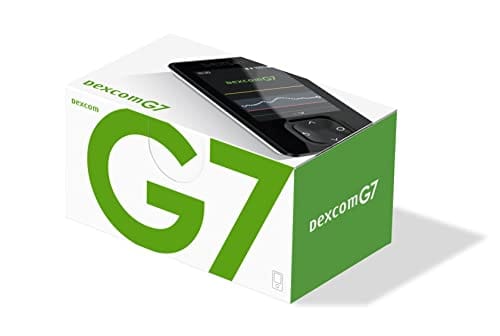
Dexcom G7 Receiver
Buy Dexcom G7 Receiver Online
Secure Encrypted Payments
Dexcom G7 Receiver is a handheld display device for the Dexcom G7 continuous glucose monitoring system. It can be ordered online for use with compatible G7 sensors, and the current price and included product information can be viewed during checkout. Choose the Dexcom G7 Receiver only when it matches your CGM setup and the instructions from your diabetes care team.
The receiver shows glucose readings, trend arrows, graphs, and alerts sent wirelessly from a wearable Dexcom G7 sensor. Many people use it when they prefer a separate medical display, cannot rely on a phone, or want a consistent screen that can stay with a caregiver at home, school, or work. It is a viewing device only; it does not insert a sensor, measure ketones, deliver insulin, or replace diabetes education.
CGM information can guide important daily decisions, so it is worth understanding what the receiver can and cannot do. Sensor readings may lag behind blood glucose during rapid changes, and a fingerstick meter may still be needed when symptoms do not match the display or when the system shows an error. Keep the manufacturer’s user materials and your clinician’s instructions available when setting up alerts or responding to unusual readings.
Price, Ordering, and Device Selection
The Dexcom G7 Receiver price may vary based on current supply, order contents, and cash-pay choices shown at the time of purchase. Review the receiver name carefully before completing your order, because the receiver is separate from the wearable sensor used for each sensor session. If you are starting CGM for the first time, make sure you also understand which sensors and backup testing supplies are needed for your complete monitoring plan.
Some customers look for US delivery from Canada as part of ongoing diabetes supply planning. We may review order details for accuracy before release through licensed pharmacies, and product handling follows the requirements that apply to the item being supplied. Delivery options may include prompt, express shipping when available for the order.
A receiver purchase should be matched to the Dexcom G7 system, not to older CGM components. If you already use Dexcom supplies, check the product name and system generation before ordering related items. The Dexcom G7 Sensor 10 Days is the related sensor type for the G7 system, while G6 components are different products.
Quick tip: Store the receiver, charger, meter, and fast-acting carbohydrates together in a diabetes kit.
What the Receiver Does in a G7 System
A continuous glucose monitor, or CGM, estimates glucose in interstitial fluid, the fluid between body cells. The wearable sensor sends data to a display, and the Dexcom G7 Receiver gives a dedicated screen for those readings. The display may show the current glucose value, a directional arrow, and a recent graph so you can see whether glucose appears steady, rising, or falling.
That trend view can be especially helpful when a single glucose number does not tell the full story. For example, a value that is in range but falling quickly may call for different attention than the same value that is stable. These patterns can also help conversations with a care team about overnight lows, morning highs, exercise, meals, and medication timing.
The receiver is not an insulin pump, meter, or emergency treatment. It cannot prevent hypoglycemia by itself, and it cannot treat high or low glucose. People managing type 1 diabetes or type 2 diabetes still need an action plan that explains when to use fast-acting carbohydrates, when to use backup testing, and when to seek urgent help.
Who May Benefit From a Dedicated Display
Dexcom G7 Receiver may be useful for people who want CGM data without relying only on a smartphone. A separate display can reduce distractions, avoid phone battery issues, and keep medical alerts apart from personal notifications. It can also be easier for caregivers to locate and use when a child, older adult, or family member needs consistent monitoring support.
People living with Type 1 Diabetes often use CGM as part of intensive monitoring, particularly when insulin dosing and hypoglycemia risk require close attention. CGM can also support selected people with Type 2 Diabetes, especially when glucose patterns are difficult to see with occasional fingerstick checks alone. Your clinician can explain whether CGM data is appropriate for your treatment plan, daily routine, and ability to respond to alerts.
A dedicated receiver may not be ideal if alerts cannot be heard, seen, or acted on safely. It may also be less practical for someone who frequently misplaces small electronics or cannot keep the device charged. People with adhesive reactions, planned procedures, or work environments involving strong electromagnetic fields should follow the official Dexcom instructions for the full CGM system.
Setup, Pairing, and Day-to-Day Use
Setup involves preparing the receiver for use with a compatible G7 sensor. Exact menu steps can change by software version, so the manufacturer’s instructions should be followed for pairing, alert settings, charging, and troubleshooting. During setup, pay close attention to time, date, language, and alert preferences, because these settings affect how the display behaves.
General use usually includes these steps:
- Charge the receiver as directed before starting regular use.
- Set the date, time, language, and basic alert preferences.
- Pair the receiver with a compatible Dexcom G7 sensor.
- Keep the receiver within the recommended range of the sensor.
- Respond to low, high, signal loss, and sensor error alerts as instructed.
- Use a blood glucose meter when confirmation testing is needed.
Why it matters: Alert settings that fit your routine can reduce missed warnings, especially during sleep.
Some people use CGM readings for everyday decisions, but there are still times when a meter is important. Confirmatory blood glucose testing may be needed if symptoms do not match the receiver, if readings change rapidly, or if the system reports missing data. This backup step can be particularly important for people using insulin or other medicines that may cause low blood sugar.
Receiver, Sensor, Phone App, and Meter Differences
The Dexcom G7 Receiver is the handheld display. The sensor is the wearable component that measures glucose data and sends that data wirelessly. A compatible smartphone app may also display CGM information for some users, but phone compatibility, battery life, app settings, and notification permissions can affect reliability.
A receiver can be a practical choice when phone access is limited or inconsistent. Workplaces, schools, camps, sports activities, and caregiver settings may all make a separate screen useful. Some people use both a receiver and another display method, depending on system instructions and what their care team recommends.
A fingerstick meter remains a different tool. It measures glucose from a blood sample at one moment in time, while CGM estimates glucose trends between checks. Products such as traditional meters and strips can remain part of a safe diabetes plan, especially when CGM data is unavailable. The broader Diabetes Care category can help you see related monitoring and support supplies.
Safety, Alerts, and When to Confirm Readings
The receiver itself usually has limited direct contact with the body, so physical side effects are more commonly linked to the wearable sensor or adhesive. Sensor-related issues may include redness, itching, discomfort, bleeding, bruising, or skin irritation at the insertion site. More significant adhesive dermatitis can occur in some users and should be discussed with a healthcare professional.
The most important receiver-related safety issue is interpretation. CGM values can differ from blood glucose meter readings, especially when glucose is rising or falling quickly. Treat physical symptoms seriously, even if the screen looks reassuring. Sweating, shakiness, confusion, weakness, unusual sleepiness, vomiting, or signs of severe illness need prompt attention according to your care plan.
Signal loss, sensor errors, and missing readings should not be ignored. These messages mean the system may not be providing dependable data at that moment. Check the manufacturer’s troubleshooting steps, keep backup testing supplies available, and talk with a diabetes clinician if gaps happen often or interfere with safe treatment decisions.
People with frequent severe hypoglycemia, hypoglycemia unawareness, pregnancy, kidney disease, major illness, or recent medication changes may need more individualized monitoring instructions. CGM alerts can be valuable, but they work best when the user and caregivers know exactly what action to take. Editorial material on Type 1 Diabetes topics and Type 2 Diabetes topics can support broader discussions with your care team.
Storage, Charging, Cleaning, and Travel
Store the receiver like a small electronic medical device. Keep it clean, dry, and protected from drops, moisture, and extreme temperatures. Avoid leaving it in a hot car, direct sunlight, near heaters, or in places where it could be crushed by luggage or heavy bags.
Cleaning should follow Dexcom’s official instructions. Harsh chemicals, soaking, or abrasive cleaning can damage the screen or housing. If the receiver becomes wet, cracked, or physically damaged, consult the user materials for safe next steps before relying on it for glucose information.
For travel, pack the receiver with a charging cable, compatible CGM supplies, a blood glucose meter, test strips, lancets, and fast-acting carbohydrates. Time-zone changes can affect clock-based settings, so confirm the receiver’s date, time, and alert schedule after long trips. Security screening and long transit days can also make it harder to access outlets, making a backup charging plan useful.
Related G7 and G6 Choices
Dexcom G7 Receiver should be matched with G7 system components. The G7 sensor is the wearable part that supplies glucose data for each sensor session. Without a compatible active sensor, the receiver cannot provide current glucose readings.
Older Dexcom G6 supplies are separate products and should not be assumed interchangeable with G7 components. If you are replacing an older system, compare the exact product names with your current supplies before ordering. Related G6 components include the Dexcom G6 Transmitter and Dexcom G6 Sensor, which belong to the G6 system rather than the G7 receiver setup.
Diabetes monitoring is only one part of care. Food choices, activity, insulin timing, sick-day planning, and routine follow-up all influence glucose patterns. General education such as Type 1 Diabetes treatment information can help you prepare questions for a clinician when starting or changing CGM use.
Questions to Ask Before Ordering
Before buying a receiver, ask whether it is the right display for your current CGM system and daily routine. Confirm which sensor generation you use, whether a phone app is also part of the plan, and how caregivers should respond to urgent alerts. If you use insulin, also ask when CGM readings are suitable for decisions and when a meter check is safer.
It is also helpful to clarify practical details. Ask how often sensors will be replaced, where backup meter supplies should be stored, and what to do during signal loss. If your receiver will be used at school, work, camp, or a care facility, make sure responsible adults know what alarms mean and when emergency treatment is needed.
Cost planning should include more than the receiver. A complete monitoring setup may involve ongoing sensors, a charger, protective storage, meter supplies, and glucose treatments. Viewing the current price while also considering replacement needs can prevent gaps in monitoring later.
Authoritative Sources
For device-specific setup, pairing, alert behavior, and troubleshooting, use the manufacturer’s official user materials: Dexcom official CGM resources.
For broader diabetes technology and CGM education, the American Diabetes Association provides patient-facing information: American Diabetes Association diabetes technology information.
This content is for informational purposes only and is not a substitute for professional medical advice.
Blood Glucose Unit Converter
Convert glucose readings between mg/dL and mmol/L without changing the clinical value.
mg/dL
-
US reporting unit
mmol/L
-
International reporting unit
These calculations are for education only and do not replace clinical advice, diagnosis, or treatment. Always confirm medical decisions with a qualified healthcare professional.
HbA1c & eAG Calculator
Convert between HbA1c percentage and estimated average glucose using the ADAG relationship.
HbA1c
-
percentage
eAG mg/dL
-
estimated average glucose
eAG mmol/L
-
estimated average glucose
These calculations are for education only and do not replace clinical advice, diagnosis, or treatment. Always confirm medical decisions with a qualified healthcare professional.
CGM Time-in-Range Summary
Summarise CGM percentages across very low, low, in-range, high, and very high glucose bands.
Entered total
-
should equal 100%
Below range
-
very low plus low
Above range
-
high plus very high
Summary
-
common adult CGM targets vary by patient
These calculations are for education only and do not replace clinical advice, diagnosis, or treatment. Always confirm medical decisions with a qualified healthcare professional.
Carb Serving Calculator
Convert total carbohydrate grams into carb choices for meal planning and diabetes education.
Carb choices
-
total carbs divided by choice size
Rounded choices
-
nearest half choice
Carb calories
-
4 kcal per gram
These calculations are for education only and do not replace clinical advice, diagnosis, or treatment. Always confirm medical decisions with a qualified healthcare professional.
Express Shipping - from $29.99
Prices:
- Dry-Packed Products $29.99
- Cold-Packed Products $39.99
Shipping Countries:
- United States (all contiguous states**)
- Worldwide (excludes some countries***)
Standard Shipping - $19.99
Shipping with this method takes 5-10 days
Prices:
- Dry-Packed Products $19.99
- Not available for Cold-Packed products
Shipping Countries:
- United States (all contiguous states**)
- Worldwide (excludes some countries***)
What is Dexcom G7 Receiver used for?
Dexcom G7 Receiver is used to display glucose readings, trend arrows, graphs, and alerts from a compatible Dexcom G7 sensor. It is a viewing device for CGM data and does not deliver insulin, insert sensors, or measure ketones.
Can Dexcom G7 Receiver replace a blood glucose meter?
No. A meter may still be needed when symptoms do not match the receiver, when readings change quickly, when CGM data is missing, or when your care plan calls for confirmation testing. Keep backup meter supplies available.
Is Dexcom G7 Receiver the same as a Dexcom G7 sensor?
No. The receiver is the handheld display, while the sensor is the wearable component that estimates glucose and sends data. The receiver needs a compatible active G7 sensor to show current glucose information.
Who might prefer a receiver instead of only using a phone app?
A receiver may suit people who want a separate medical display, have limited phone access, worry about phone battery life, or need a consistent screen for caregivers at home, school, or work.
What should I do if the receiver shows signal loss or missing data?
Follow the manufacturer’s troubleshooting instructions, keep the receiver within the recommended range of the sensor, and use a blood glucose meter if you need a current reading. Contact your diabetes care team if gaps happen often.
Rewards Program
Earn points on birthdays, product orders, reviews, friend referrals, and more! Enjoy your medication at unparalleled discounts while reaping rewards for every step you take with us.
You can read more about rewards here.
POINT VALUE
How to earn points
- 1Create an account and start earning.
- 2Earn points every time you shop or perform certain actions.
- 3Redeem points for exclusive discounts.
You Might Also Like
Select options
This product has multiple variants. The options may be chosen on the product page
Select options
This product has multiple variants. The options may be chosen on the product page
Select options
This product has multiple variants. The options may be chosen on the product page
Select options
This product has multiple variants. The options may be chosen on the product page